Essay Tech Governance
Data Backup and Recovery Planning for Small Nonprofits
A practical plan for protecting donor and client records on a small budget.
Data backup and recovery planning for small nonprofits is about keeping services running when records and systems become unavailable. A workable plan can fit a small budget with deliberate choices about what to protect, how quickly to restore it, and who takes responsibility. Cloud storage alone cannot answer those questions.
Why small nonprofits are more exposed to data loss than they appear
Small nonprofits keep Social Security numbers, bank account details, health-related records, and detailed histories of what people have given. These are not ordinary office files. Donor CRMs and case management systems can hold personal and health information subject to HIPAA, HUD requirements, and state privacy law. Yet with few staff and grants that set the pace of technology upgrades, many organizations protect that information with consumer-grade infrastructure and one person who knows how everything works.
Hurricane Ian exposed the consequences of that mismatch in 2022. Nonprofits in affected areas lost access to client records and intake systems just when people needed their services most. The same disaster could also make the organization’s sole technical contact unavailable. Sensitive data does not become easier to protect because the team responsible for it is small.
What data loss actually costs a nonprofit — operationally, financially, and in donor trust
An attacker encrypts donor records, financial files, and grant documentation on a Friday afternoon and demands payment. Without a written recovery plan, leadership’s answer becomes “we figure it out as we go”. That uncertainty can mean days or weeks of downtime. During that time, the organization must try to serve clients while losing access to the records that demonstrate accountability to funders.
The damage spreads beyond the locked files. Inaccessible giving histories lead to duplicate outreach and missed follow-ups, while unavailable email, phones, and SMS systems interrupt contact with volunteers and clients. Missing documentation increases audit exposure, and a rushed restore can itself create compliance problems if required records of entries and changes are lost. Staff effort shifts from program delivery to reconstruction. Lost pledge records also weaken supporters’ confidence that their commitments are being managed responsibly, and that confidence can be harder to restore than the data.
The Microsoft license case and what it revealed about cloud dependency
The 2025–2026 Microsoft grant license phaseout showed that organizations can lose access to data without a cyberattack. One operator of a child healthcare nonprofit reported receiving no notification from Microsoft while continuing to receive official invoices listing no charges. He lost approximately 500 gigabytes of organizational data stored in OneDrive. He had not backed it up externally because OneDrive appeared to be the backup.
The distinction is between service availability and recoverability. Even when a cloud provider protects against outages in its own infrastructure, an organization may still lose data if an account is terminated or compromised, data is deleted by accident, or records are overwritten. Free grant access can make a vendor relationship feel permanent, even though its terms can change. In this case, that assumption left no independent fallback. A deliberate plan would have identified OneDrive as outside the formal backup job and exposed the absence of a separate copy under the nonprofit’s control.
The five gaps that cause nonprofit backup plans to fail when they are needed
First, teams need to check whether anyone has restored the backup. A successful job is not proof of recovery. CISA’s guidance says teams should test how quickly they can restore all or part of their data. Second, teams need to check whether every system holding donor or grant information is included, especially hosted email and CRMs. The Microsoft case shows how easily a familiar cloud service can escape that inventory.
Third, teams need to establish how long each system can remain unavailable. Without a recovery time target, a team cannot judge whether its backup process is fast enough for payroll or client intake. The fourth is whether someone other than the usual technical contact can follow the recovery steps. A volunteer’s absence should not make the plan unusable. Both gaps can be addressed before an incident by defining acceptable downtime and documenting responsibilities.
The fifth check, particularly important in the ransomware scenario, establishes whether the backup itself can be altered or deleted. An immutable copy cannot be changed or deleted for a set period, giving the organization a protected recovery option when live data is encrypted. Immutability protects the copy that restore testing depends on, while that testing remains necessary.
Building the backup architecture: the 3-2-1 rule applied to nonprofit realities
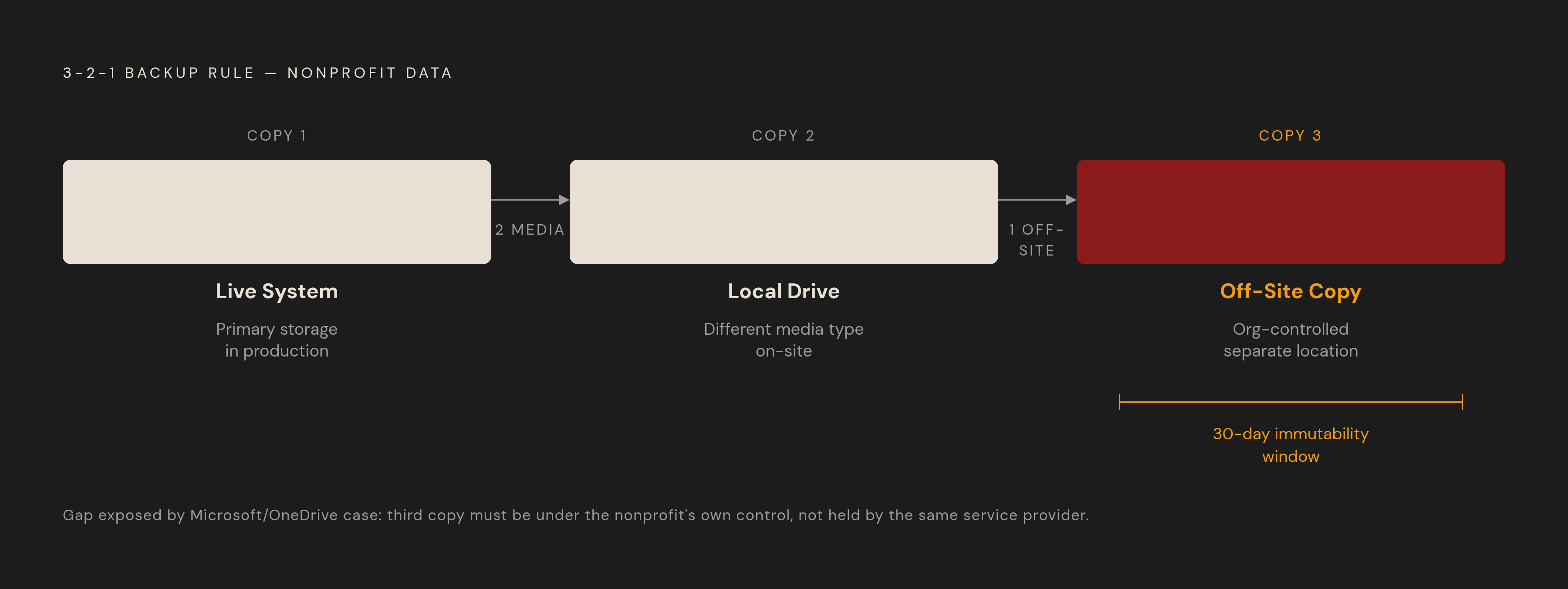
Start with the 3-2-1 rule: keep three copies of critical data on two different types of storage, with one copy off-site. A local drive and cloud storage can provide different storage types, while a physically separate location can also satisfy the off-site requirement. Location alone is not enough, however. The off-site copy needs to remain under the organization’s control rather than depend entirely on the service holding the live data.
To set this up, write down whether each backup saves a full system image or specific files and databases. Include every system holding donor or grant information, then record backup frequency, retention, monitoring responsibility, and restore-testing arrangements. A 30-day immutability window protects a backup from alteration during that period. Someone must still monitor the jobs, because a software update, full drive, or newly added system can create a silent gap.
In Scott Ship’s case involving a 72-staff nonprofit, the backup had never actually worked. The recovery project produced a role-assigned runbook, followed by a live drill in Week 9 and a Recovery Certification delivered to the board in Week 10.
Prioritizing systems and setting recovery targets before an incident forces the decision
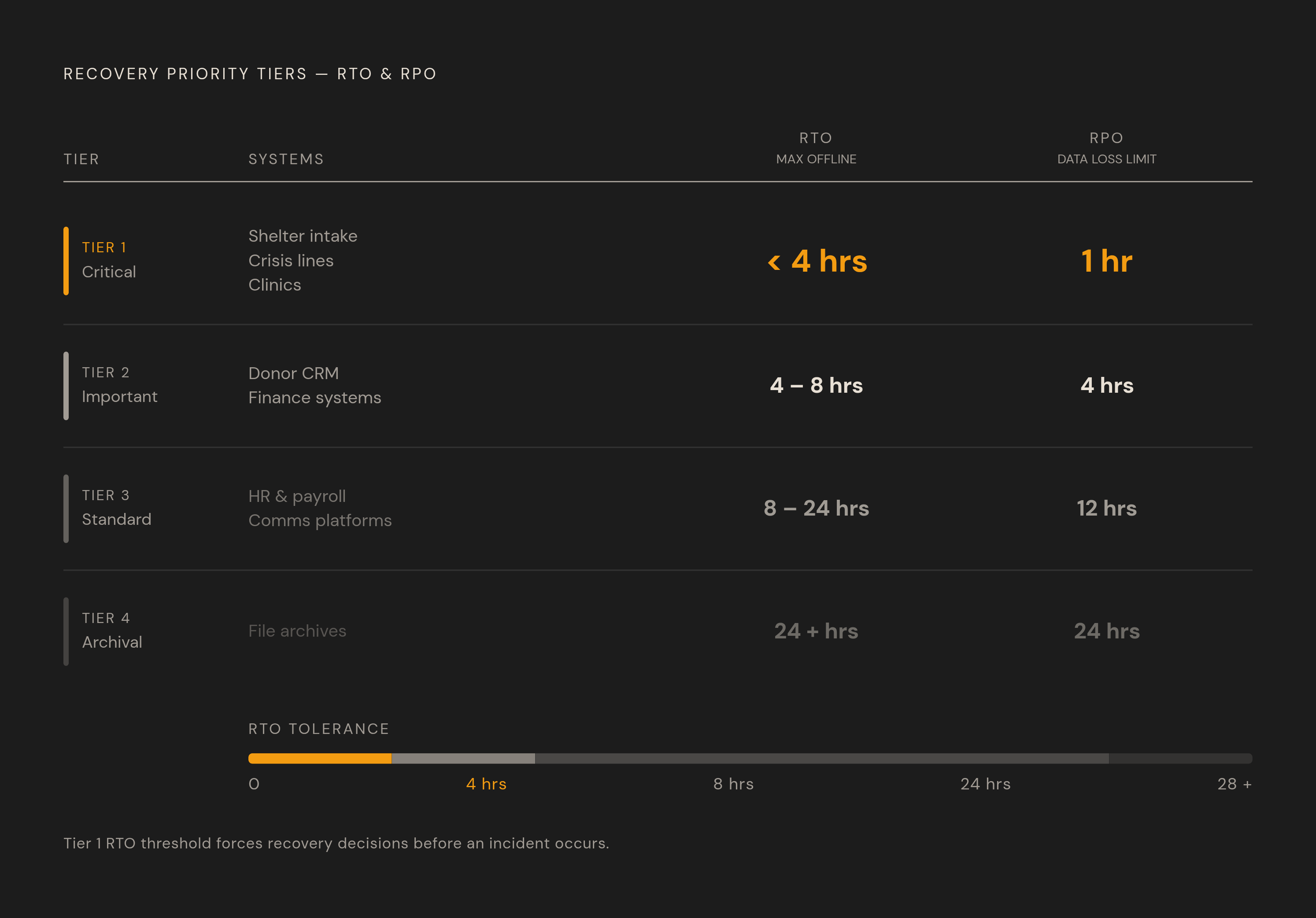
Once copies are protected, the next decision is restoration order. Assign every system a recovery tier based on the harm its absence would cause. A shelter’s intake system cannot be treated like an internal wiki. For shelters, clinics, and crisis lines, Tier 1 systems may need a Recovery Time Objective of less than four hours. The RTO is the longest a system can be offline before the organization’s work suffers.
The Recovery Point Objective answers a different question. How much recent data can the organization afford to lose? Payroll or daily intake may need an RPO of one hour, while a file archive may be able to lose a full day of data. That tolerance determines backup frequency. Ready.gov includes both targets in business impact analysis so that the technical plan follows what the organization needs to do its work.
These decisions also protect leadership’s attention during an incident. Restoration competes with notifications to funders, boards, CoC leads, and potentially affected clients, so the recovery order should already be written down. The plan must remain accessible when its systems are unavailable. Store it in at least two locations, including a printed copy that does not require internet access.
Hurricane Ian exposed the consequences of that mismatch in 2022.
Documenting recovery procedures and assigning ownership so the plan survives staff turnover
For each Tier 1 and Tier 2 system, the runbook should identify its purpose, vendor contact details, support hours, and backup location. It should explain how to access the backup and restore the system, with an expected completion time and a way to verify that the restored system works. Write for someone who did not build it. Point to the password manager for access to credentials. Keep passwords out of the plan itself.
The runbook also needs named roles for declaring a disaster, leading technical recovery, and communicating with funders, the board, and clients. Those responsibilities extend beyond restoring files. A Disaster Recovery Plan restores critical systems, data, and processes after an incident. A Business Continuity Plan keeps services running during and immediately after it, while an Incident Response Plan covers containment, investigation, and notification when a security or privacy incident is suspected. They serve different purposes and should not be collapsed into one document.
For client-serving organizations, continuity may mean paper intake forms, mobile devices, or relocation through a partner agency. These are practical fallbacks. Staff may be serving clients from temporary locations while dealing with the disaster’s effects on their own lives. A usable plan accounts for those conditions rather than assuming everyone will be available at a familiar desk.
Testing the plan: why a backup that has never been restored is not a backup
Automatic backups create a reassuring sense that protection is happening without attention. An unverified backup offers no such certainty. A test restore establishes whether the copy is usable, whether the runbook works as written, and whether the expected restoration time is realistic. It also tests whether the assigned person can complete recovery without the original system architect present.
For a resource-constrained nonprofit, quarterly full restore tests are a reasonable starting cadence for Tier 1 systems. Put them on the calendar. Confirm that someone actively monitors success and failure alerts. After a significant software update, cloud migration, or staff transition, treat the backup as unverified until it has been retested. Naming the board as a recipient of recovery test results gives the organization a reason to stick to the schedule.
New systems, vendor changes, and staff departures can make an accurate runbook wrong. Test findings should therefore lead from reports into revisions. A plan written once and filed away becomes less dependable as the organization changes.
Cloud tools and backup software that offer genuine nonprofit pricing
Box offers advanced sharing controls and online collaboration, with nonprofits starting at 100GB free or receiving 50% off Business, Business Plus, Enterprise, or Enterprise Plus plans with unlimited storage. Those controls are useful where sensitive files also need to be shared. Proton Drive takes a different security approach through zero-knowledge encryption. Proton describes the service as engineered to help organizations meet requirements including GDPR and HIPAA, and paid plans offer up to 10 years of file versioning. Those features do not, by themselves, establish that an organization’s full workflow is compliant.
For organizations that want a different way to pay, pCloud has a lifetime plan option and a discounted family plan. Carbonite has nonprofit discounts and a simple interface for creating and managing backups, which can suit teams with little technical know-how. Neither price nor ease of use proves ransomware resilience. These services can provide an off-site copy, but the selection still needs to fit the plan’s access, retention, and recovery needs. The copy must be under the nonprofit’s control and separate from the network holding live data or the primary backup.
The database sovereignty question: what nonprofits using Airtable should consider about data ownership
Recovery involves more than files and email. Airtable can replace fragile spreadsheets for intake, program tracking, and donor data, but the vendor still controls the software. Backup and export depend on that relationship. Governance requires assessing whether a price increase, grant change, or shutdown would leave enough time to export usable data and restore it elsewhere without losing structure.
Baserow is an open-source no-code database under the MIT license, free to self-host, with cloud pricing of $5/user/month. Grist is self-hostable under Apache 2.0 and fits calculation-heavy or sensitive workflows, with cloud access available for a per-user monthly fee. Both place backup work with the organization when self-hosted. For relational links, rollups, and downstream API consumers, tools such as NocoDB or Baserow can preserve the relational model in a controlled database backup rather than reduce it to a CSV export that loses structure.
Other options address different organizational needs. Notion combines documents, tasks, and lightweight databases, but is not self-hostable and retains a vendor-controlled model. Salesforce Nonprofit Cloud offers 10 free licenses through the Power of Us Program, and its enterprise-level complexity matters when donor management becomes the main system the organization uses to do its work. SeaTable is designed for GDPR compliance, with a provider based in Mainz, Germany, servers in Germany, and an on-premises option.
When internal planning is not enough: what should a nonprofit look for in a technology partner?
A nonprofit should look for a partner willing to implement and maintain recovery. The scope should include backup architecture, system priorities, runbooks, role assignments, scheduled tests, and immutable off-site copies. Maintenance is part of that scope. Alert monitoring and updates after staff or system changes are often the work a small internal team cannot sustain.
Before an engineering engagement, the assessment should also ask whether the existing data architecture can be recovered meaningfully. For no-code or vibe-coded tools, protecting files may not preserve the structure the program depends on. That finding can justify replacing repeated patches to the existing system with a rebuild on a sound foundation. A partner can help evaluate database options against the nonprofit’s data complexity and capacity to maintain them.
Technical scope alone is not enough for the relationship. The partner also needs to understand limited budgets, grant-funded technology cycles, and staff who hold several roles. Values alignment is visible in whether recovery decisions protect both client services and infrastructure. The useful commitment is an ongoing one, with someone responsible for keeping the plan current and proving that recovery still works.
Notes
- Disaster Planning and Recovery for Nonprofits and Social Service Agencies - Nutmeg
Supplied the disaster-planning material on recovery tiers, runbooks, named roles, and continuity fallbacks for client-serving organizations.
- Data Backup Best Practices 2026: 7 Steps To Secure Data - Red Diamond Information Services
Informed the guidance on the 3-2-1 rule, immutable copies, restore testing, and monitoring backup jobs.
- What Happens When a Nonprofit Loses Its Data? Causes, Impact & Recovery Outcomes
Informed the discussion of what data loss costs a nonprofit in downtime, donor trust, and audit exposure.